
Local residents can now text 9-1-1
By Kathy Thomson
Text-to-9-1-1 is now available in Shackelford County, according to sheriff Ed Miller.
“The project has been in the works for a while, and it is now up and running as of the first of the year,” said Miller.
The nationwide project was designed to give 9-1-1 callers the ability to send a text message to reach emergency call takers from a mobile phone or device. Work on the project began in 2014, was rolled out in a few Texas counties in 2017 and 2018, and more counties were added in 2019.
“The state had to put in equipment that could communicate with the major cell phone carriers,” said the local sheriff. “This is part of the statewide -9-1-1 system. Although the system is now up and functioning, whenever possible people should still call instead of texting when they need emergency help.”
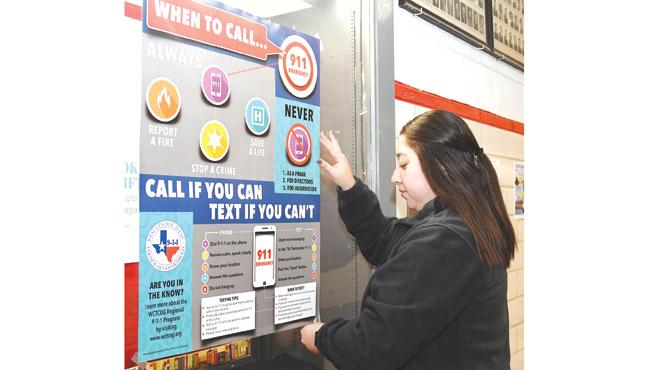
Miller said that the slogan is “Call if You Can, Text if You Can’t.”
According to Texoma Council of Governments public safety program manager C.J. Durbin-Higgins, texting provides less accurate location information to dispatchers, the sender must have a data plan, and messages from internet-based platforms will not be received. However, in situations where a voice call cannot be made, assistance can be summoned using text.
“This gives another option in the event that you’re in a situation where you can’t call, such as a domestic abuse event or perhaps an active-shooter-type situation,” Durbin-Higgins said.
Other times to use text to contact 911 for emergency help include when the calling party is deaf, the caller is injured and cannot speak, or if they are in a remote location or cell service is overwhelmed and only text messages can be sent.
“Shackelford County telecommunicators will respond to 9-1-1 text in the same manner they would a 9-1-1 telephone call,” said Miller. “You can interact with the 9-1-1 operator. We can also transfer to the appropriate county if needed.”
Text instructions include the following.
Open text messaging.
Enter 9-1-1 in the “To” field.
Enter your location.
Push the “Send” button.
Answer the questions.
Texting Tips
Text to 9-1-1 must be sent from a phone with a service plan.
Photos and videos cannot be sent to 9-1-1 at this time.
Text to 9-1-1 will not work in a group message.
Never text and drive.
Cell Phone Tips
Wireless phone calls to 9-1-1 are different from those calls made from a business or home because 9-1-1 operators can’t automatically identify the location the wireless call is coming from.
The West Central Texas Council of Governments recommends the following when calling 9-1-1 from a cell phone.
If you’re in a vehicle, pull over and stop.
Dial 9-1-1 and immediately tell the call taker that you are calling from a wireless phone.
Speak calmly and clearly.
Give your location first, then your name and cell phone number.
Describe the nature of the emergency.
Give a description of the individual or vehicle involved (if you are able to do so without putting yourself or others at risk).
If you get disconnected, dial 9-1-1 again.
Stay on the line until the call taker tells you to hang up.
